Restart Windows Services Automatically
Windows Service Monitoring Software with Scheduled Restarts

|
|
US $279.00
|
| |

|
|
- Restart windows services automatically.
- Rest easy knowing your servers are up and running!
- Keep expensive downtime to a minimum.
- Services are automatically restarted - no human intervention required!
- Service Hawk runs as a Windows Service to ensure that it stays running - even after you log out.
- No limit to the number of services you can monitor.
- Runs on server and desktop versions of Windows.
- Free top-notch Technical Support.
- One full year of Update Protection included with purchase.
- 30-day Unconditional 100% Money Back Triple Guarantee.
-
Ensure your security today! - Only US $279.00, with Volume Pricing available.
|
Why You Need Service Hawk:
- Schedule services to automatically restart regardless of their current state, even if they are supposedly still running.
- Selectively choose which services you wish to monitor, and specify how often to verify their status
- Optional service failure notifications via customizable emails, on-screen messages, and sound alerts
- Get immediate notifications via email, on-screen messages, or sound alerts.
- Send email notifications to multiple recipients
- Easily keep track of past service interruptions via comprehensive logging
- Control individual services (Start/Stop, Pause/Resume, Restart) directly from within Service Hawk
- Modify start-up type for each service (Automatic, Manual, Disabled)
- Optionally include low-level Kernel and System Driver services
- Supports both HTML and plain text email notifications
- Add one or more file attachments to email notifications
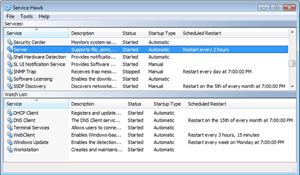
Service Hawk can periodically restart services on a user-defined schedule regardless of their state, ensuring that the service is running smoothly and stays operational. Scheduling a restart for the service will take place at the specified restart time regardless of what state the specified service is currently in (even if the service is supposedly still running). This is particularly useful for ensuring that a service is running in a healthy state. Sometimes a service will report that it is "running" but is in a hung or frozen state, so restarting the service on a user-defined schedule is a great solution in most cases.
Security breaches also take place every day, but that doesn't mean you should have to spend lots of time or money monitoring your servers just to make sure you are protected. Hackers, bugs, or even system crashes can wreak havoc on the profitability of your business if given the opportunity. You must protect yourself from disasters like this! The good news? Service Hawk can do it for you. Automatically.
Additional Full Version Benefits
- No limit to the number of services you can monitor.
- One full year of free software upgrades included with purchase.
- Free top-notch Technical Support.
- 30-day Unconditional 100% Money Back Triple Guarantee.